

Connect channels
Connect Instagram
How to link an Instagram professional account for Direct, comments and mentions.
Requirements
Section titled “Requirements”- An Instagram professional account (business or creator). If no account is granted at login, the connection is rejected with
instagram_account_not_professional. - You do not need a Facebook Page.
- The person logging in must manage the account on Instagram.
- On the account, turn on Settings → Messages and story replies → Message controls → Connected tools → Allow access to messages. Without it Direct does not work (see Direct access disabled).
Permissions
Section titled “Permissions”Messajo only asks for the permissions of the Instagram API with Facebook Login for Business:
| Permission | What for | Required |
|---|---|---|
instagram_basic |
Read the account profile and media | yes |
instagram_manage_messages |
Receive and send Direct messages | yes |
instagram_manage_comments |
List, reply to, hide and delete comments; private replies; mentions | no |
instagram_content_publish |
Publish photos, videos, carousels, Reels and Stories | no |
instagram_manage_insights |
Read the insights of the account and of each post | no |
Without one of the two required permissions the connection is not created (signup_scope_mismatch). The others can be unchecked on the Instagram screen: the account connects, the connection page shows Missing permissions and the feature answers 403 instagram_scope_missing, with the permission in details[0].message, until you reconnect.
Step by step
Section titled “Step by step”- Open Connections → Connect Instagram. The panel navigates to Meta’s page (Facebook Login for Business), with no popup and working on mobile.
- Sign in, choose the Instagram account(s) Messajo may access and confirm.
- Meta sends you back to Messajo, which exchanges the code for an access token, reads the account, subscribes the app to the webhooks and reads the messaging profile.
- Done: the account shows as Active, with the subscribed webhook fields.
- One account granted: it connects directly.
- More than one: Messajo shows a picker and connects one per login. Repeat the login to connect the others.
- None: error
instagram_account_not_professional.
If you cancel on the Meta screen, the attempt shows in the connection History with the CANCEL event. If a step fails after the connection is created, it stays Pending with the missing step, and Finish connection redoes only what is missing.
An organization can connect several accounts. To connect a customer’s account, send an invite link with the Instagram channel: the person authorizes from the invite’s public page, without a Messajo account.
Access that does not expire
Section titled “Access that does not expire”The access does not expire, so there is nothing to renew. If Meta revokes it (password changed, app removed from the account, error 190), the connection becomes needs_reconnect with token_invalid and the owner gets the notice with the reconnection link. Reconnecting keeps the same connection.
Direct access disabled
Section titled “Direct access disabled”If Allow access to messages is turned off on the account, the connection health check reports reason: "dm_access_disabled": a connection.updated event goes out and the panel shows a warning. The connection stays active, and comments, publishing and insights keep working; only Direct does not. To fix it, on Instagram open Settings → Messages and story replies → Message controls → Connected tools and turn on Allow access to messages. The warning clears on the next check.
Accounts connected before this version
Section titled “Accounts connected before this version”Accounts connected with Instagram Login must reconnect once. Message ids from Meta differ between the two logins.
Message types
Section titled “Message types”Instagram and Messenger use the same engine and the same POST /v1/messages. to is the contact’s IGSID (or Messajo’s ctc_…).
type |
Messenger | ||
|---|---|---|---|
text (with quick_replies on IG/Messenger) |
yes | yes | yes |
image · video · audio · document |
yes | yes | yes |
images (2 to 10 images in one message) |
no | yes | no |
reaction |
yes | yes | yes |
like |
no | yes | no |
share (share a post of the account) |
no | yes | no |
buttons · cards |
no | yes | yes |
template · interactive · location · contacts · sticker |
yes | no | no |
A type outside the matrix returns 422 type_not_supported_by_channel. On Instagram, text is up to 1,000 bytes; images up to 8 MB (JPEG, PNG or GIF); audio, video and PDF up to 25 MB. typing: true shows “typing” before the send and POST /v1/messages/{id}/read marks the conversation as seen. The contact arrives with name, username and picture (read on the first message and every 7 days).
Windows and HUMAN_AGENT
Section titled “Windows and HUMAN_AGENT”Meta only lets you reply inside a window opened by the contact’s last message:
| Window | When it applies |
|---|---|
| 24 hours | Any reply, counted from the contact’s last message |
| 7 days | After the contact replies to a Direct ad (Messajo recognizes the ad referral) |
| 7 days | With tag: "human_agent" |
tag: "human_agent" is only for replies written by a person (Meta policy): never use it in automation or bots. The panel does not offer the tag in automations. It requires the Human Agent feature approved in App Review; without it Meta rejects and Messajo returns 403 human_agent_not_approved.
Outside the window, Messajo rejects before calling Meta: 422 outside_service_window, with the window end in details[0].message. With the tag and more than 7 days: 422 human_agent_window_closed. Reactions, likes and share do not open or extend the window.
Comments, private replies and mentions
Section titled “Comments, private replies and mentions”With instagram_manage_comments, Messajo subscribes the comments, live_comments and mentions fields and delivers the comment.* and mention.received events (catalog).
| What | /v1 route |
Event |
|---|---|---|
| Comments on a post (live from Meta, with Messajo’s state) | GET /connections/{id}/posts/{post_id}/comments |
— |
| Reply in public | POST /connections/{id}/comments/{comment_id}/replies with { message } (up to 2,200 characters) |
comment.replied |
| Hide or show | POST /connections/{id}/comments/{comment_id}/hide with { hidden } |
comment.hidden · comment.unhidden |
| Delete | DELETE /connections/{id}/comments/{comment_id} |
comment.deleted |
| Private reply | POST /connections/{id}/comments/{comment_id}/private-reply |
comment.private_replied + message.sent |
| Mentions | GET /connections/{id}/mentions |
mention.received |
A private reply sends a Direct message to the commenter, even without an open 24-hour window. Meta’s rules: only text, buttons or cards; one per comment (409 private_reply_already_sent); up to 7 days after the comment, and on a live comment only during the live (422 private_reply_window_closed). The reply opens the conversation with the contact and the next messages follow the normal windows.
You can only delete comments on the account’s own media (comment_not_owned). Your reply comes back from Meta as a webhook, but does not produce an event again.
Messaging profile
Section titled “Messaging profile”In Connections → (account) → Messaging profile, or with GET/PUT /v1/connections/{id}/messaging-profile:
- Ice breakers: up to 4 per language, up to 80 characters each, with the
payloadthat arrives in the webhook when the person taps. - Persistent menu: up to 20 items (
postbackor link). - Ad welcome messages: on Instagram, welcome messages are the Direct ad flows (
/v1/connections/{id}/welcome-flows). A flow used in an ad cannot be changed or deleted (welcome_flow_in_use).
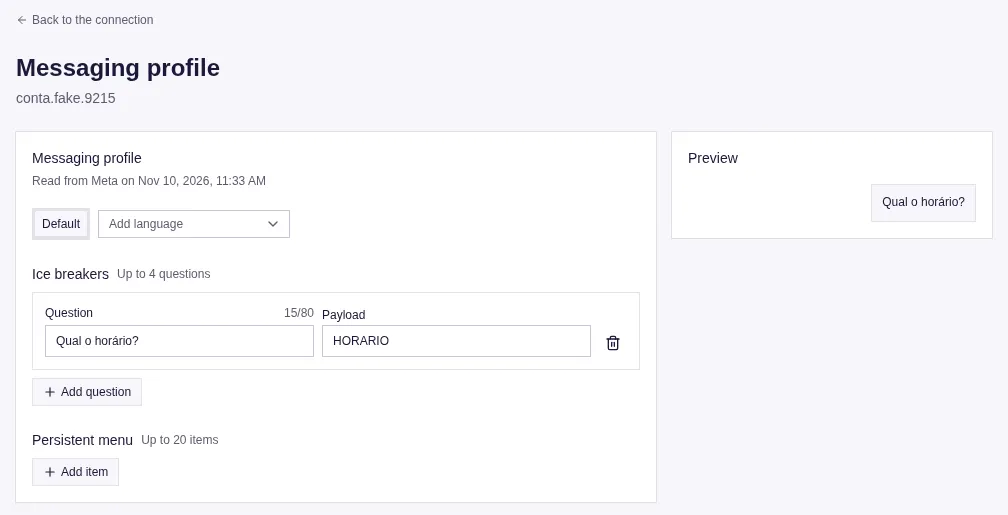
The PUT is partial: a missing field does not change, null deletes. After saving, Messajo reads the profile back from Meta.
Mirror layer
Section titled “Mirror layer”If you already speak the Instagram Graph API, use /v1/instagram/{ig_user_id}/... with Meta’s body and response untouched: Messajo adds the account token and checks the key’s permission. Standalone nodes (media, comment, container, message) live at /v1/instagram/{ig_user_id}/nodes/{node_id}.
POST …/messagesrecords the message in the logs, spends the send tokens and returnsX-Messajo-Message-Id.subscribed_apps,access_tokenandoauth/*are blocked (403mirror_path_blocked).media_publishthrough the mirror does not go through Messajo’s scheduling: to schedule, use/v1/publications.
What Meta does not allow
Section titled “What Meta does not allow”- bulk sending (there are no campaigns on Instagram);
- messages outside the window;
- groups;
- personal accounts: it only works with a professional account.