

Connect channels
Connect Messenger
How to link a Facebook Page to chat through Messenger.
Requirements
Section titled “Requirements”- A Facebook Page.
- Being an admin of the Page (or having full control of it through the business portfolio), with a role that allows messaging (
MESSAGINGorMANAGE).
Permissions
Section titled “Permissions”| Permission | What for |
|---|---|
pages_show_list |
List the Pages you manage, to choose which one to connect |
pages_manage_metadata |
Subscribe the app to the Page webhooks |
pages_messaging |
Receive and send Messenger messages |
pages_read_engagement |
Read basic data of the Page and its conversations |
business_management |
Access Pages that belong to a business portfolio |
Without pages_messaging or pages_manage_metadata the connection is not created (signup_scope_mismatch).
Step by step
Section titled “Step by step”- Open Connections → Connect Messenger. The panel navigates to Facebook Login for Business (no popup, works on mobile).
- Sign in to Facebook, choose the Pages Messajo can access and accept the permissions.
- Back in the panel, if more than one Page is available, tick in Choose the Pages which ones to connect and tap Connect Pages. Each chosen Page becomes a connection. A Page already connected in another organization, or without a messaging role, shows as disabled, with the reason.
- Done: each Page shows as Active.
With no Page that can be connected, the attempt ends with messenger_no_pages. A failure on one Page does not undo the others.
To connect a customer’s Page, send an invite link with the Messenger channel: the person authorizes and chooses the Pages from the invite’s public page.
Page token
Section titled “Page token”The Page token does not expire: there is no refresh. When connecting, Messajo subscribes the app to the Page (subscribed_apps) to receive the webhooks; every 15 min it checks the subscription and, if the app is gone from the list, subscribes again (connection.updated with reason: "resubscribed"). If someone removes the permissions, the connection moves to needs_reconnect (token_invalid) and the owner gets the reconnection link.
Messages
Section titled “Messages”Messenger uses the same engine and the same type matrix as Instagram, with these differences:
tois the contact’s PSID (or Messajo’sctc_…);- text up to 2,000 characters; attachments up to 25 MB;
- one image per message (no
images), nolikeand noshare; - Meta’s read receipt (
watermark) becomesmessage.statuswithreadfor every message up to that moment.
Windows
Section titled “Windows”| Window | When it applies |
|---|---|
| 24 hours | Any reply, counted from the contact’s last message |
| 7 days | After the contact replies to an ad |
| 7 days | With tag: "human_agent" |
tag: "human_agent" is only for replies written by a person, never for automation, and requires the Human Agent feature approved in App Review (without it: 403 human_agent_not_approved). The other Messenger tags were discontinued by Meta and are not accepted. Outside the window: 422 outside_service_window.
Messaging profile
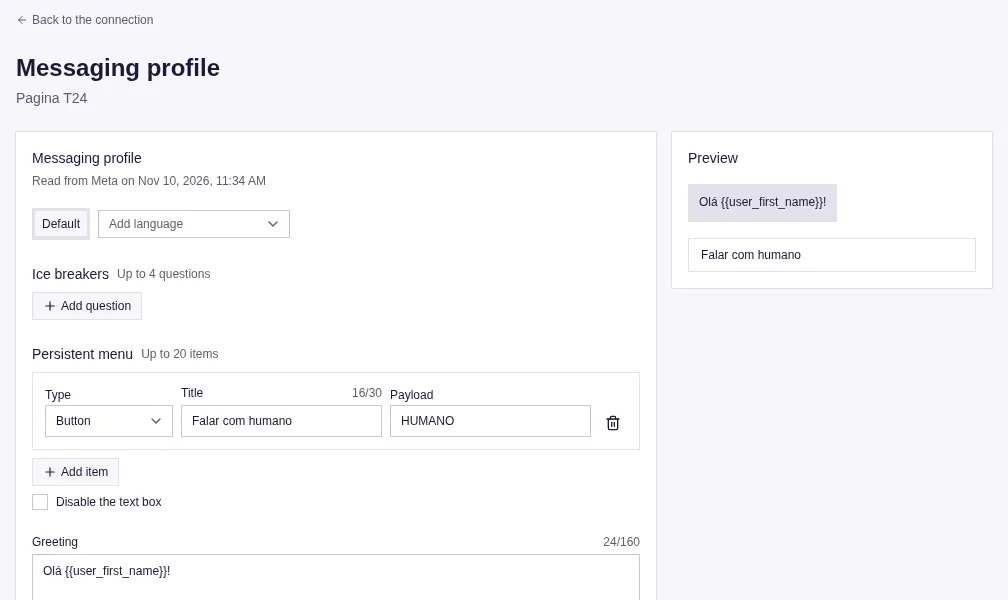
Section titled “Messaging profile”In Connections → (Page) → Messaging profile, or with GET/PUT /v1/connections/{id}/messaging-profile:
- Ice breakers: up to 4 per language;
- Persistent menu: up to 20 items, with the option to disable the composer;
- Greeting: up to 160 characters, accepts
{{user_first_name}}; - Get started: the “Get started” button and the
payloadit sends. Messajo saves “Get started” before the menu (Meta requires it) and does not let you delete it while there is a menu.
Mirror layer
Section titled “Mirror layer”/v1/messenger/{page_id}/... forwards to the Graph API with the Page token, with Meta’s body and response untouched; standalone nodes at /v1/messenger/{page_id}/nodes/{node_id}. POST …/messages records the message in the logs; subscribed_apps and the token routes are blocked (403 mirror_path_blocked), and pass_thread_control/take_thread_control require a key with admin permission.